
1. Introduction
Choosing the best hosting for your website is one of the most important decisions in 2026. Many beginners focus only on cheap pricing, but hosting affects your website speed, SEO rankings, security, uptime, and user experience. If your hosting is slow or unreliable, your visitors may leave your website before it even loads properly.
A good hosting provider helps your website load faster, stay secure, and handle more traffic smoothly. Whether you are starting a blog, business website, portfolio, or eCommerce store, selecting the right hosting can improve your website performance and help your online growth.
In this guide, you will learn everything about choosing the best hosting provider for your website step by step.
2. What is Web Hosting?
Web hosting is a service that stores your website files and makes them available on the internet. Every website contains files such as images, text, videos, and code. These files are stored on special computers called servers.
When someone types your website name into a browser, the hosting server delivers your website files to the visitor’s screen.
For example:
- Domain Name = Your website address
- Hosting = The space where your website files are stored
Without hosting, your website cannot go live on the internet.
3. Different Types of Web Hosting
Understanding hosting types is important because every website has different needs.
Shared Hosting
Shared hosting is the most affordable hosting type for beginners. In this hosting, multiple websites share the same server resources.
Best For:
- Beginners
- Small blogs
- Portfolio websites
- Low-traffic websites
Advantages:
- Cheap pricing
- Easy to use
- Beginner-friendly setup
Disadvantages:
- Slower performance during high traffic
- Limited server resources
If you are starting your first website, shared hosting is usually the best option.
VPS Hosting
VPS stands for Virtual Private Server. It provides dedicated resources inside a shared environment.
Best For:
- Growing websites
- Medium traffic websites
- Businesses needing better performance
Advantages:
- Faster speed
- Better security
- More server control
Disadvantages:
- More expensive
- Requires some technical knowledge
Cloud Hosting
Cloud hosting uses multiple servers together to provide high performance and stability.
Best For:
- Large websites
- High traffic websites
- eCommerce stores
Advantages:
- Excellent uptime
- High scalability
- Handles traffic spikes easily
Disadvantages:
- Slightly expensive
- Advanced settings for beginners
WordPress Hosting
This hosting is optimized specifically for WordPress websites.
Best For:
- WordPress users
- Bloggers
- Affiliate marketers
Advantages:
- Faster WordPress performance
- Easy WordPress installation
- Better WordPress security
Disadvantages:
- Limited flexibility for non-WordPress websites
Dedicated Hosting
In dedicated hosting, you get an entire server for your website.
Best For:
- Enterprise websites
- Very high traffic websites
Advantages:
- Maximum speed
- Full server control
- High security
Disadvantages:
- Very expensive
- Requires technical expertise
4. Important Factors to Consider Before Choosing Hosting
This is the most important section because these factors directly affect website performance.
Website Speed and Performance
Website speed is extremely important in 2026 because users expect fast-loading websites. Slow websites increase bounce rates and negatively impact SEO rankings.
A good hosting provider should offer:
- SSD or NVMe storage
- LiteSpeed servers
- CDN support
- Optimized caching
Fast hosting improves:
- User experience
- Google rankings
- Conversion rates
Uptime Guarantee
Uptime means how often your website stays online.
A hosting provider should offer at least:
- 99.9% uptime guarantee
If your website frequently goes offline:
- Visitors lose trust
- Sales may decrease
- SEO rankings can drop
Reliable uptime is essential for every website.
Customer Support
Beginners often face technical issues while managing hosting. Good customer support can save time and prevent website downtime.
Choose a hosting provider offering:
- 24/7 live chat support
- Email support
- Knowledge base tutorials
Fast customer support is very important for beginners.
Security Features
Website security is more important than ever in 2026 because cyber attacks are increasing.
A good hosting provider should include:
- Free SSL certificate
- Malware scanning
- Automatic backups
- Firewall protection
- DDoS protection
Secure hosting protects your website data and visitor information.
Storage and Bandwidth
Storage determines how many files your website can store.
Bandwidth controls how much traffic your website can handle.
For beginners:
- 10GB to 50GB SSD storage is usually enough
- Unlimited bandwidth is ideal
Avoid overpaying for resources you do not need initially.
Ease of Use
A beginner-friendly hosting dashboard makes website management easier.
Look for:
- Simple control panel
- One-click WordPress installation
- Easy domain management
Hosting should simplify website management, not make it complicated.
Scalability
Your website may grow in the future, so your hosting should support upgrades easily.
Good hosting providers allow:
- Easy plan upgrades
- Additional server resources
- Traffic scaling without downtime
This helps your website grow smoothly.
Pricing and Renewal Costs
Many hosting companies offer very cheap introductory pricing, but renewal prices are much higher.
Before purchasing:
- Check renewal costs
- Compare long-term pricing
- Look for hidden charges
Affordable hosting should also remain affordable after renewal.
5. Best Hosting Providers in 2026
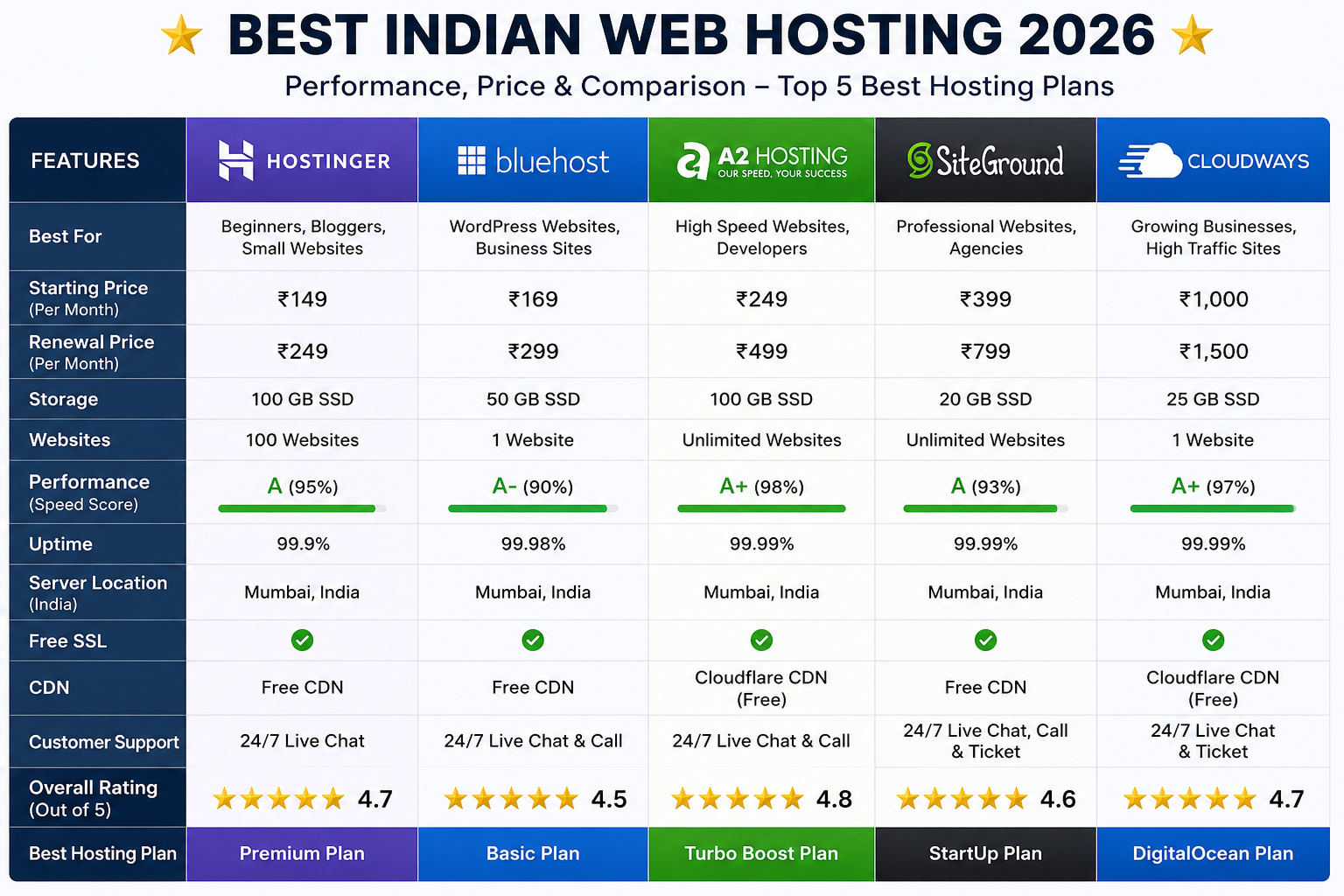
Here are some popular hosting providers beginners can consider:
Hostinger
Best for affordable hosting with excellent speed and beginner-friendly features.
Features:
- LiteSpeed servers
- Free SSL
- Free domain
- Easy control panel
Best For:
- Beginners
- Bloggers
- Small businesses
Bluehost
Popular WordPress hosting provider that many beginners choose for its guided WordPress setup. Check the renewal price before you buy.
Features:
- WordPress optimization
- Free domain
- Easy setup
Best For:
- WordPress websites
- Bloggers
SiteGround
Known for premium support and strong performance.
Features:
- Excellent customer support
- Advanced caching
- Strong security
Best For:
- Business websites
- Professional blogs
Cloudways
Managed cloud hosting for advanced performance.
Features:
- High scalability
- Cloud infrastructure
- Fast loading speed
Best For:
- Growing websites
- eCommerce stores
6. Common Mistakes Beginners Make
Many beginners choose hosting incorrectly and face problems later.
Choosing Only Cheap Hosting
Cheap hosting may offer poor speed and weak customer support.
Always balance:
- Price
- Performance
- Features
Ignoring Renewal Pricing
Some hosting companies increase prices heavily after the first term.
Always check:
- Renewal cost
- Long-term affordability
Ignoring Server Location
Choose servers close to your target audience.
Example:
- Indian audience → Indian or Asian servers
Closer servers improve loading speed.
Not Reading Reviews
Customer reviews help identify:
- Real uptime performance
- Support quality
- Hidden issues
Always research before purchasing.
7. Which Hosting is Best for Different Website Types?
Different websites require different hosting plans.
| Website Type | Recommended Hosting |
|---|---|
| Blog Website | Shared Hosting |
| Business Website | VPS Hosting |
| eCommerce Store | Cloud Hosting |
| Portfolio Website | Shared Hosting |
| High Traffic Website | Dedicated Hosting |
Choosing the correct hosting improves overall website performance.
8. SEO Tips Related to Hosting
Hosting directly affects SEO performance.
Fast Hosting Improves:
- Core Web Vitals
- User experience
- Google rankings
Important SEO Hosting Features:
- CDN integration
- Fast server response time
- SSD storage
- High uptime
Good hosting creates a strong SEO foundation.
9. How to Buy Hosting Step-by-Step
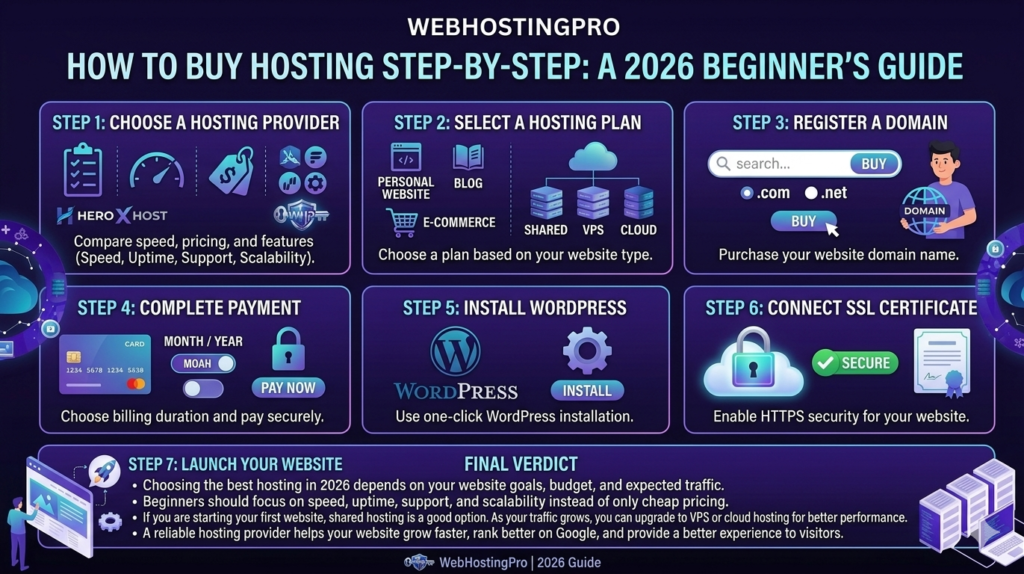
Step 1: Choose a Hosting Provider
Compare speed, pricing, and features.
Step 2: Select a Hosting Plan
Choose a plan based on your website type.
Step 3: Register a Domain
Purchase your website domain name.
Step 4: Complete Payment
Choose billing duration and pay securely.
Step 5: Install WordPress
Use one-click WordPress installation.
Step 6: Connect SSL Certificate
Enable HTTPS security for your website.
Step 7: Launch Your Website
Customize your website and publish it online.
10. Final Verdict
Choosing the best hosting in 2026 depends on your website goals, budget, and expected traffic. Beginners should focus on speed, uptime, support, and scalability instead of only cheap pricing.
If you are starting your first website, shared hosting is a good option. As your traffic grows, you can upgrade to VPS or cloud hosting for better performance.
A reliable hosting provider helps your website grow faster, rank better on Google, and provide a better experience to visitors.
11. Frequently Asked Questions (FAQs)
Which hosting is best for beginners in 2026?
Shared hosting is best for beginners because it is affordable and easy to manage.
Is shared hosting good for SEO?
Yes, good-quality shared hosting with fast servers can perform well for SEO.
Can I change hosting later?
Yes, you can migrate your website to another hosting provider anytime.
How much does hosting cost in 2026?
Basic shared hosting plans in India usually start from around ₹69 to ₹300 per month on long-term plans, depending on the provider and features. Always check renewal prices before buying.
Which hosting is best for WordPress?
WordPress hosting or optimized shared hosting is best for WordPress websites.
3 thoughts on “How to Choose the Best Hosting for Your Website in 2026 (Complete Beginner’s Guide)”